


Photo Video Maker with Music
4.469.00 Reviews
App Specs
- Version
- 4.9
- Updated On
- License
- Free
- Downloads
- 5,000,000+
- Developer
- Supercool Labs
- Categories
- Video Players & Editors
- Platform
- Android
Screenshots
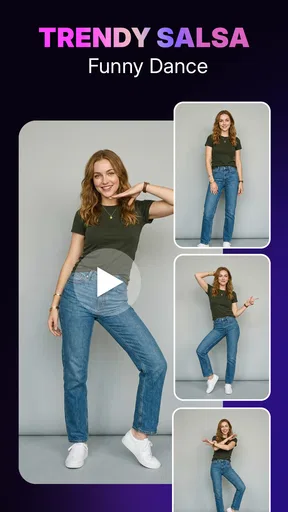


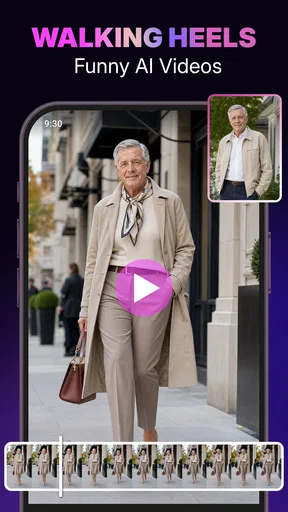
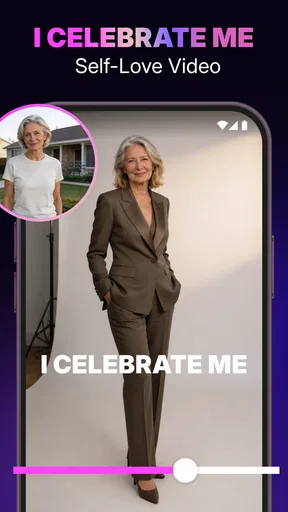


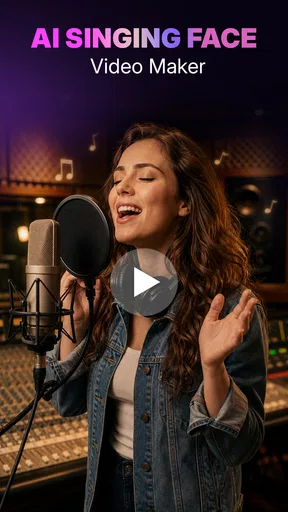
 Analysis by AppCompare
I often end up with a phone full of photos that are fun on their own but don’t tell a story together. A quick slideshow can make them easier to revisit or share, and Photo Video Maker with Music is aimed at that sort of small, practical creative job. I’d think of it as a phone-based video maker for turning selected images and clips into a finished sequence, rather than as a replacement for a full desktop editing setup.
A shared phone, a shared moment
It’s easy to picture this app being used around a kitchen table: one person picks photos from a birthday, a day out, or a school event, while someone else suggests which moments belong in the final cut. That kind of collaboration can be casual and useful, especially when the goal is a short keepsake rather than a carefully produced film. The app’s emphasis on photos, music, effects, and templates suits a group that wants to make something presentable without first learning a complicated timeline editor.
For a realistic household workflow, I’d decide on the audience before choosing a style. A private family montage can take its time and include quieter moments; a clip meant for a group chat may work better with fewer images and a clear opening. I’d also ask everyone to agree on which pictures are appropriate to include before exporting or sharing. The editing tool can help assemble a video, but it cannot make that choice on behalf of the people in the photos.
Keep the project simple and intentional
When several people are contributing, the first useful step is sorting the material before opening an editor. Put the strongest pictures near the beginning, set aside near-duplicates, and decide whether the video should feel funny, calm, or celebratory. That small bit of planning makes it easier to choose music and effects that support the memory instead of competing with it. It also avoids the common trap of adding every available transition just because it is there.
I’d treat templates as a starting point, not a rule. They can help when you want a coherent look quickly, but a template may not suit a sequence with mixed portrait and landscape images or a very different mood from the one it suggests. Previewing the order and watching the whole result once before sharing is worthwhile: a title can appear over a busy image, a transition can interrupt a quiet moment, or a music change can make the edit feel more energetic than intended.
Account boundaries matter on a shared device, too. If more than one person uses the phone, I would keep the editing session focused on the intended project and check the selected media carefully. Don’t assume that a family-friendly app automatically separates people’s libraries or gives each user a private workspace. Before handing the device to someone else, it’s sensible to close the project and make sure the next person knows which photos they are working with.
Who will get the most from it?
This is a good fit for someone who wants to turn a small set of phone photos and clips into a social-ready montage without spending an evening learning advanced editing software. It can also suit a parent or relative making a quick recap of a gathering, or a casual creator who prefers choosing a template and refining the result rather than building every edit from scratch. Supercool Labs is the developer, and the app sits in the video player and editing space, with a focus on accessible creation rather than deep professional controls.
Worth Reading Before You Choose

EA SPORTS FC Mobile 26 Is a Bigger Football Game, but It Takes Time

Flipboard Shows What News Apps Must Do Beyond the Feed

Switching to Android Auto Means Rethinking Your Driving Routine

Google Calendar Makes a Crowded Week Easier to Manage

Ludo King Makes the Most of the Minutes Between Plans

Baby Panda World Brings Quick Play to Modern Phones, but Its Game Library Feels Busy
By contrast, I’d choose a more advanced editor for projects that need precise audio mixing, detailed control over timing, layered graphics, or a consistent production workflow across many videos. A basic slideshow tool may be better if all you need is a few pictures in sequence and you don’t care about effects or music. This app occupies the middle ground: more expressive than a plain photo album, but intended for quick, approachable edits rather than fine-grained post-production.
For children or teens using a shared phone, I’d make the first session a supervised one. The age rating is Everyone, but that doesn’t answer every household question about which photos to use or where a finished video should be posted. I’d review the images and destination together, especially when other people appear in the footage. The app’s suitability for a broad audience is not a substitute for family decisions about privacy and sharing.
Getting Started with the App
First things first, downloading and installing Photo Video Maker with Music is a breeze. Available on both Android and iOS, it’s just a tap away from transforming your media game. Once you fire it up, you're greeted with a clean and intuitive interface. Trust me, you don't need to be tech-savvy to navigate through its features. Everything is laid out in a straightforward manner, making the app super user-friendly.
It’s a free app, with in-app purchases ranging from around $3.49 to $33.99 per item. That makes it reasonable to try the basic experience before deciding whether paid extras are useful to you. I’d set a clear spending boundary if a child is helping with a project: agree in advance whether purchases are off limits, and have an adult handle any decision about them. A free starting point is helpful, but it doesn’t mean every option inside the app will necessarily be free.
Its current version is 2.2, and it runs on Android 7.0 or later. That can make it a practical option for an older Android phone that still handles everyday media, though performance can depend on the device and the size of the project. If a montage contains many large clips, I’d keep the first attempt modest and save or export a shorter test before building a much longer edit. That gives you a chance to judge how smoothly your own phone handles the workflow.
Features That Stand Out
So, what makes this app shine? Let’s break it down:
- Easy Photo and Video Editing: Whether it's a birthday bash or a serene sunset, you can turn any moment into a masterpiece. The app lets you trim, cut, and merge videos effortlessly. It’s like having a mini editing suite in your pocket!
- Music Integration: This is where the magic happens. Choose from a wide range of tunes to add just the right mood to your creations. Feel like a director as you match the beats to your visuals.
- Stunning Effects: Filters, transitions, you name it. The effects library is packed with options to make your videos pop. You can even add text overlays to make your message loud and clear.
- Share with Ease: Once you’ve crafted your masterpiece, sharing it on social media is just a tap away. The app supports direct sharing to all major platforms, so all your friends can marvel at your creativity.
One useful editing habit is to choose the music after you have a rough image order. If the soundtrack sets the pace too early, it’s tempting to keep adding pictures simply to fill the time. I’d first make a compact sequence, then see whether the chosen track suits it. For a family recap, a familiar, gentle mood can matter more than a dramatic effect; for a playful birthday clip, a livelier choice may fit better. The point is to let the soundtrack serve the pictures, not force the pictures to serve the soundtrack.
Text is most helpful when it adds context that the images cannot provide on their own, such as a place or a short occasion label. I’d keep wording brief and place it where it won’t cover faces or the main action. A video viewed on a small screen can make elaborate text difficult to read, so checking the result at phone size is more useful than judging it only while editing. This is a simple way to make a polished-looking montage clearer without adding more effects.
Before sharing, I’d also consider whether the music and images are suitable for the intended destination. A clip for a private family chat and one for a public social post have different audiences. When other people are shown, especially children, it’s courteous to ask before posting. Direct sharing can reduce steps, but taking a moment to confirm the destination helps prevent an accidental public post or sending the wrong version to a group.
Personal Experience
I took a weekend trip recently and decided to put the app to the test. With just a few taps, I had a cool video montage of my adventures, complete with a catchy tune in the background. The transitions were smooth, and the effects added a professional touch. I even threw in some text to highlight the best moments. Honestly, it felt like I had a personal editing team right on my phone.
That kind of quick result is where I see the app being most useful: you can make a compact record of an outing while the photos are still easy to find and the details are fresh. It’s also a handy format for relatives who weren’t there; a sequence of a few chosen moments can be easier to watch than a long stream of unedited clips. I’d still keep the original photos and videos rather than treating the montage as the only copy. A finished edit is convenient for viewing, while the originals give you more flexibility if you later want a different order or style.
For a recurring household project—say, a short recap after each trip—I’d use a consistent approach rather than chase a new effect every time. Pick a similar length, keep titles readable, and choose music that fits the occasion. That makes the videos feel connected without requiring anyone to remember complicated editing steps. The trade-off is that a repeated template can make separate events look alike, so I’d change one visual choice when the mood or subject calls for it.
What to expect before choosing it
With an average rating of 4.8 from around five thousand ratings, and more than a million installs, it has clearly found an audience among people looking for straightforward mobile creation. Those figures are useful context, but they don’t tell me whether its workflow will match every person’s taste. Someone who wants fast results may value the approachable tools; someone who likes to adjust every cut may find a simpler template-led process restrictive. I’d judge it by the kind of video you actually want to make, not by popularity alone.
The app was released on June 19, 2023, and carries an Everyone content rating. Its free entry point is appealing for occasional use, while optional purchases mean households should be clear about spending before sharing the phone. If your priority is a private archive, a standard gallery app may be enough; if you want careful control over sound and timing, a more advanced editor is likely a better match. I’d choose this one when convenience and a finished-looking slideshow matter more than granular production control.
Final Thoughts
So, is Photo Video Maker with Music worth your time? Absolutely. It’s a powerhouse of creativity packed into a simple app. Whether you're a social media enthusiast or just someone who loves to capture memories, this app has something for everyone. The combination of ease of use and a wide range of features makes it a must-try for anyone looking to elevate their media game. So go ahead, give it a whirl, and let your creativity run wild!
My more measured recommendation is to start with one small project: choose a handful of photos, decide who will see the result, and make a short draft before committing time to a bigger montage. That will quickly show whether its templates, music, and editing style feel right on your device. For casual creators and households making shared memories, it offers an inviting way to turn a camera roll into something people can watch together. For demanding edits or strict privacy and account separation needs, I’d look elsewhere or keep the workflow under one person’s supervision.
Pros
- User-friendly interface for easy editing.
- Wide variety of music tracks available.
- Quick export to social media platforms.
- Supports high-resolution video output.
- Includes diverse transition effects.
Cons
- Contains ads that can interrupt workflow.
- Limited free version features.
- Occasional app crashes reported.
- Music library requires internet access.
- Editing tools lack advanced features.
FAQs for Photo Video Maker with Music
What features does Photo Video Maker with Music offer?
Photo Video Maker with Music allows users to create stunning videos by combining photos, video clips, and music. The app offers a variety of editing tools, such as filters, transitions, and text overlays. Users can also select from a library of licensed music or add their own tracks to enhance their creations.
Is Photo Video Maker with Music free to use?
The app offers a free version with basic features, but it also provides in-app purchases for premium features. These may include additional filters, transitions, and a wider selection of music. Users can choose to upgrade for an ad-free experience and access to exclusive content.
What platforms is Photo Video Maker with Music available on?
Photo Video Maker with Music is available for both Android and iOS devices. Users can download the app from the Google Play Store for Android or the Apple App Store for iOS. It is optimized for a variety of devices, ensuring a smooth user experience across different models.
Is it easy to use Photo Video Maker with Music?
Yes, Photo Video Maker with Music is designed with user-friendliness in mind. It features an intuitive interface that guides users through the video creation process. Beginners can easily get started with pre-designed templates, while more advanced users can explore custom options for personalized projects.
Does Photo Video Maker with Music offer customer support?
Yes, the app provides customer support to help users with any issues they may encounter. Users can access FAQs, tutorials, and contact options within the app. Additionally, there is an online community where users can share tips and seek advice from other experienced creators.


